Tutorial - Layout Reorderer Selectors
Organizing chunks of content
The Layout Reorderer is a special case of a Reorderer that handles arbitrary chunks of content, or "modules," laid out in columns. The key to using the Layout Reorderer is in laying out your modules appropriately, and in communicating where the columns and modules are to the component.
Columns and Modules
The Layout Reorderer works with modules of content that are organized into columns, as in the image below. In this example, we have five content modules organized into two columns: three in the left column and two in the right.
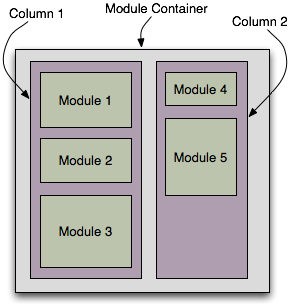
This component is in Production status
Join the infusion-users mailing list and ask your questions there.
The Layout Reorderer requires that
- your content modules be contained inside your columns, and that
- your columns are contained inside a single container.
This may be accomplished using nested <div> elements, for example. Markup for the sample image might look like the example shown on the right:
<div id="main-container">
    <div id="left-column">
        <div>Module 1</div>
        <div>Module 2</div>
        <div>Module 3</div>
    </div>
    <div id="right-column">
        <div>Module 4</div>
        <div>Module 5</div>
    </div>
</div>
Selectors
The Layout Reorderer needs to know which HTML elements are the containers, and which are the modules. This is accomplished using CSS selectors.
Default Selectors
As with all Fluid components, the Layout Reorderer is configured to work with default values for the column and module CSS selectors. These defaults are shown in the table below.
columns |
".flc-reorderer-column" |
modules |
".flc-reorderer-module" |
To use these defaults, simply add these classes to your markup. Using the example above, this would look like the example on the right:
<div id="main-container">
    <div class="flc-reorderer-column" id="left-column">
        <div class="flc-reorderer-module">Module 1</div>
        <div class="flc-reorderer-module">Module 2</div>
        <div class="flc-reorderer-module">Module 3</div>
    </div>
    <div class="flc-reorderer-column" id="right-column">
        <div class="flc-reorderer-module">Module 4</div>
        <div class="flc-reorderer-module">Module 5</div>
    </div>
</div>
Overriding the Default Selectors
If you don't want to use the default selectors, you can define your own, and pass them to the Layout Reorderer in the options parameter to the creator function.
Using the original example above (the one without the classes added), you might choose selectors that look like this:
var myOptions = {
    selectors: {
        columns: "#left-column, #right-column",
        modules: "#left-column>div, #right-column>div"
      }
}
var myLayoutReorderer = fluid.LayoutReorderer(container, myOptions);
Or, you might already have your own custom classes on the columns and modules, like this:
<div id="main-container">
    <div class="content-column">
        <div class="news-block">Module 1</div>
        <div class="news-block">Module 2</div>
        <div class="news-block">Module 3</div>
    </div>
    <div class="content-column">
        <div class="news-block">Module 4</div>
        <div class="news-block">Module 5</div>
    </div>
</div>
In this case, you can use these classes as your selectors, like this:
var myOptions = {
    selectors: {
        columns: ".content-column",
        modules: ".news-block"
      }
}
var myLayoutReorderer = fluid.LayoutReorderer(containerElement, myOptions);
So long as you use valid CSS selectors that identify all of your columns and modules, and provide them to the Layout Reorderer throught the options object, the Layout Reorderer will be able to figure it out.