User Profile Illustration
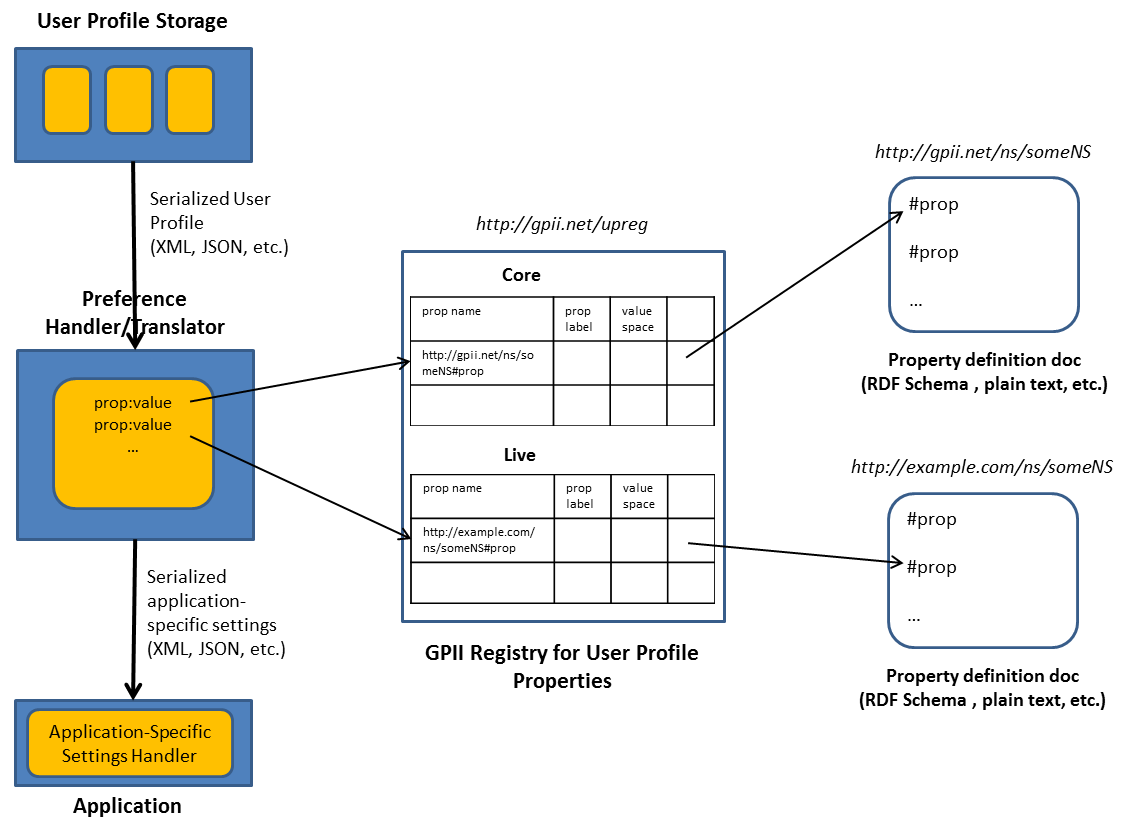
Here is a short description/explanation of the figure:
- User profiles are stored in a user profile storage (e.g. a server, or a local storage).
- A user profile is transferred from the user profile storage to the preference handler/translator in a serialized format (XML, JSON, etc.).
- The preference handler/translator reads the user profile and its property names (which are URIs).
- The GPI registry for user profile properties (e.g. at http://gpii.net/upreg) contains a list of core and live property names. For each property name, human-readable labels are defined in multiple languages, and the value space is defined in a machine-readable fashion. Also, a pointer into a property definition document may be provided.
- A property definition document contains a machine-readable definition of a property (e.g. as RDF Schema file, plain text, etc.). For core properties, these property definition documents are hosted by GPII. For live properties, they may be hosted by other entities.
- The preference handler/translator computes a „best match“ for the application-specific settings, based on the user profile.
- Application-specific settings are transferred from the preference handler/translator to an application-specific settings handler in a serialized format (XML, JSON, etc.).